
In Xojo 2026r2, developers targeting Windows now have a new option for DesktopHTMLViewer: support for Microsoft Edge WebView2.
This is an important change for those who want modern web rendering on Windows without the large deployment footprint required by the Chromium Embedded Framework (CEF).
Why WebView2 Matters
Until now, Windows HTML rendering in DesktopHTMLViewer has primarily relied on CEF. While CEF provides excellent compatibility and a consistent Chromium-based rendering engine, it also comes with a substantial deployment cost. Including the required CEF runtime files can add well over 200 MB to an application’s distribution size.
Using CEF also means applications are tied to specific Chromium and CEF versions bundled with the app itself. Keeping current requires continuously rebuilding and redistributing newer CEF releases as Chromium evolves and security updates are released.
WebView2 changes that equation considerably.
Because WebView2 uses the Microsoft Edge rendering engine already present on many modern Windows systems, applications can avoid bundling a large embedded Chromium runtime entirely. Security and changes to WebView2 are handled through the operating system via Windows Update, rather than requiring applications to ship and maintain their own browser engine updates.
WebView2 Runtime Requirements
One important consideration is that WebView2 may require the Microsoft Edge WebView2 Runtime to be installed on the target system.
Windows 11
Most Windows 11 systems already include WebView2 as part of the operating system, so no additional installation is usually necessary.
Windows 10
Many Windows 10 systems already have the runtime installed because Microsoft distributes it through Edge and Microsoft 365 updates. However, older or managed systems may still require a separate runtime installation.
Applications that depend on WebView2 should verify runtime availability during installation and, if it is not present, either prompt the user or provide a link to download and install the required runtime.
👉 You can also check
DesktopHTMLViewer.IsAvailableat runtime to determine whether WebView2 is available.
Microsoft provides the runtime here:
https://developer.microsoft.com/en-us/microsoft-edge/webview2/
WinUI Targets Use WebView2 by Default
For WinUI desktop targets, WebView2 is now the default (and only) HTML rendering engine for the DesktopHTMLViewer. In addition, any new projects created in Xojo 2026r2 or later will default to using the WebView2 engine whenever a DesktopHTMLViewer is added to the layout.
Enabling WebView2 in older projects or non-WinUI Windows targets
For traditional Windows desktop targets that are not using WinUI, you can still opt into WebView2 support by enabling the HTMLViewer uses WebView2 option in the Advanced Windows build setting in the IDE:
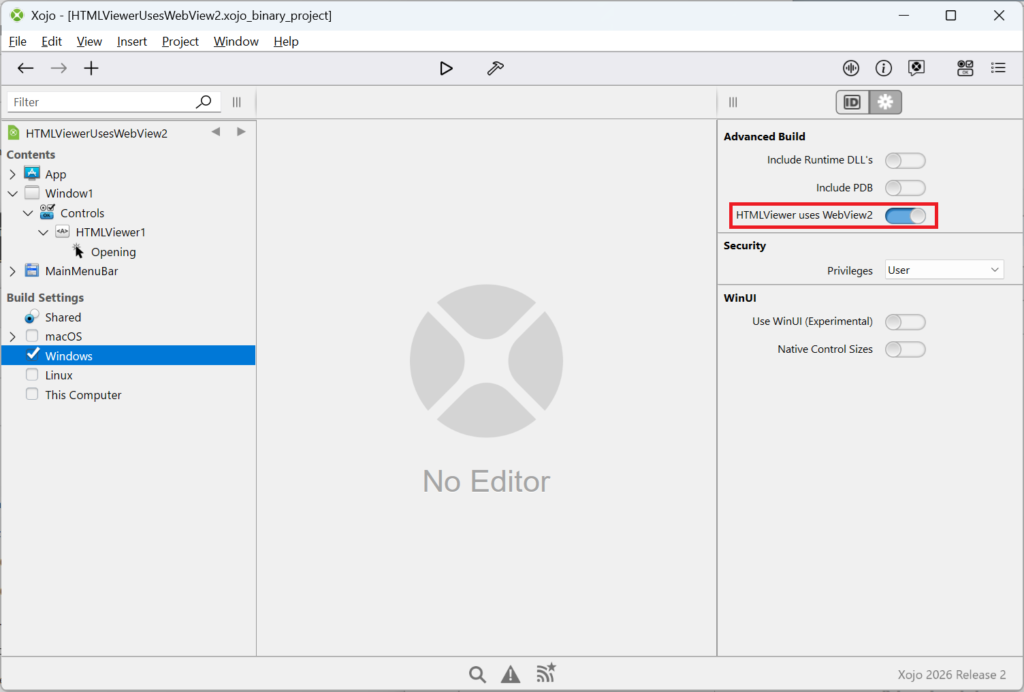
When enabled, DesktopHTMLViewer will use WebView2 instead of CEF for HTML rendering.
This gives you the flexibility to choose between:
- smaller deployment size with WebView2, or
- fully self-contained deployment with CEF
depending on the needs of your application and target audience. However, moving forward we will be transitioning away from CEF entirely, and it is likely that we will no longer support or update our CEF based HTMLViewer in future releases.
Differences from CEF
Although both CEF and WebView2 are Chromium-based technologies, there are some behavioral differences you should be aware of:
- You may notice some subtle differences in how WebView2 returns results for JSON.Stringify when executed using ExecuteJavaScriptSync. i.e. the result coming back may be quoted.
- executeInXojoSync is supported, but it uses JavaScript Promises to simulate synchronous behavior, so existing code may need to be updated to use async/await. Example:
const result = await executeInXojoSync("addNumbers", 2, 3); - A WebView2-specific cache folder is created alongside the executable. If that directory is not writable, the cache folder is instead created in the user’s local AppData directory.
Final Thoughts
The addition of WebView2 support for DesktopHTMLViewer is a major improvement for Windows desktop deployment in Xojo, and reducing runtime size by hundreds of megabytes while still delivering modern Chromium-based rendering is a significant win.
Those who require rendering consistency or offline/self-contained deployments may still prefer CEF, but WebView2 offers an excellent modern alternative that better matches the direction of the Windows platform itself.
For now, you can choose between either engine depending on your needs, but moving forward we believe WebView2 is the preferred path on Windows. Happy browsing!
William Yu grew up in Canada learning to program BASIC on a Vic-20. He is Xojo’s resident Windows and Linux engineer, among his many other skills. Some may say he has joined the dark side here in the USA, but he will always be a Canadian at heart.