
I ran across something recently that had me truly scratching my head. My goal was to measure how much extra time it would take for some additional functionality I wished to add to a project. The initial code was performing a query on a table in a database and then looping through the RowSet returned to populate five columns of a DesktopListBox with each row from the RowSet. I created a new project to test a simple form of the code. I added some code to measure the performance in microseconds. Next, I created an identical test except this time there was an extra line of code inside the loop that assigned a DatabaseRow from the RowSet to the row’s RowTag. This was the extra functionality I wanted. The tests would show me the cost of this functionality in terms of performance.
Test 1
Var rs As rowset = SQLiteDatabase1.SelectSQL("SELECT invoices.invoiceno, invoices.invoicedate, invoices.invoiceamount, customers.firstname, customers.lastname FROM Invoices JOIN Customers ON invoices.customerid = customers.id")
Results1.RemoveAllRows
Var grandTotal As Integer
Var totalIterations As Integer  = 10
For i As Integer = 1 To totalIterations
  Var start As Integer = System.Microseconds
  For Each row As databaserow In rs
    ListBox1.AddRow(rs.Column("InvoiceNo"), rs.Column("lastname"), rs.Column("firstname"), rs.Column("InvoiceDate"), rs.Column("InvoiceAmount"))
  Next
  Var stop As Integer = System.Microseconds
  Var total As Integer = stop - start
  grandTotal = grandTotal + total
  Results1.AddRow("Test " + i.ToString + ": " + total.ToString)
Next
Var avg As Integer = grandTotal / totalIterations
results1.AddRow("Average: " + avg.ToString)
Test 2
Var rs As rowset = SQLiteDatabase1.SelectSQL("SELECT invoices.invoiceno, invoices.invoicedate, invoices.invoiceamount, customers.firstname, customers.lastname FROM Invoices JOIN Customers ON invoices.customerid = customers.id")
Results2.RemoveAllRows
Var grandTotal As Integer
Var totalIterations As Integer  = 10
For i As Integer = 1 To totalIterations
  Var start As Integer = System.Microseconds
  For Each row As databaserow In rs
    ListBox1.AddRow(rs.Column("InvoiceNo"), rs.Column("lastname"), rs.Column("firstname"), rs.Column("InvoiceDate"), rs.Column("InvoiceAmount"))
    ListBox1.RowTagAt(ListBox1.LastAddedRowIndex) = row
  Next
  Var stop As Integer = System.Microseconds
  Var total As Integer = stop - start
  grandTotal = grandTotal + total
  Results2.AddRow("Test " + i.ToString + ": " + total.ToString)
Next
Var avg As Integer = grandTotal / totalIterations
results2.AddRow("Average: " + avg.ToString)
I assumed the second test would take longer since it’s doing the extra step of assigning the row to the RowTag property. However, when I ran the test, something curious occurred. The second test, rather than taking more time to complete, took less. This made no sense to me. It’s doing more so it should take longer. It’s not logical that asking it to do more would result in the task taking less time. After examining my code, I could not find any issues with it.
I modified the code to run each test 10 times then compute the average of all 10 tests. Depending on the run, the average time for Test 2 was nearly always shorter. Occasionally the average for Test 1 would be shorter than Test 2 but rarely. In fact, on my M4-based MacBook Pro, Test 2’s average was, in most cases, anywhere from 5% to 25% faster than Test 1. Next I tested it on an M1-based MacBook Pro with similar results. Then I tested it on an x86-based PC running Windows 11. This time Test 2 was slightly slower than Test 1 as I had been expecting from the beginning. Last but not least, I tested on Windows 11 running via Parallels on my MacBook Pro, compiling for ARM-64. In this test, Test 2 was indeed faster. I tried running these tests by changing the order (Test 1 then Test 2 followed by Test 2 then Test 1) and by quitting between runs. None of that seemed to matter.
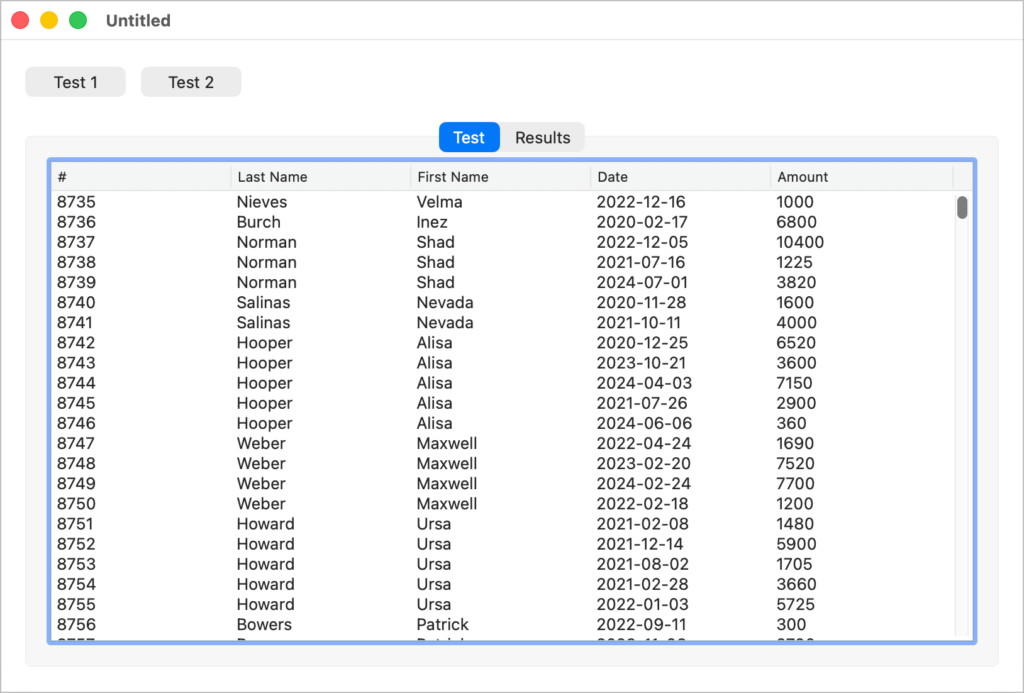
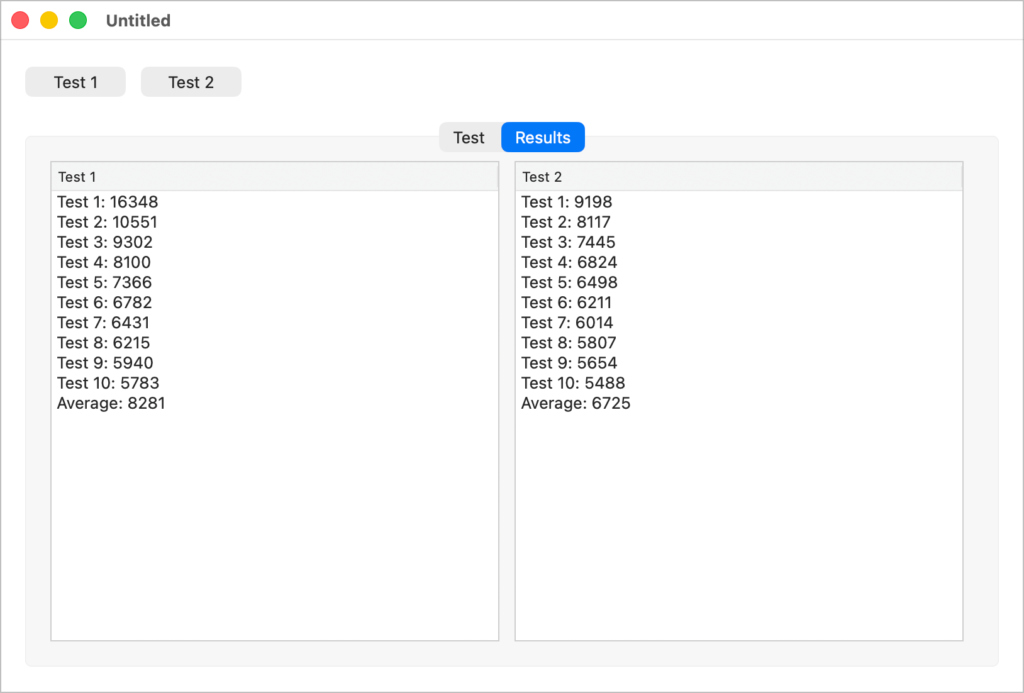
The difference appears to be ARM. It could be the compiler or the CPU. Our Director of Engineering, Travis Hill, suspects that perhaps something like the branch predictor in the CPU is hopping a tiny bit faster because of the extra assignment and thus can better predict the next operation with the For Each loop. That could be. The timing is in microseconds so the difference is so small that for my purposes, it doesn’t matter. However, that it’s faster to do more work in this case is fascinating and unexpected.
In any case, it’s interesting to see code behave in a way that is so counterintuitive. Asking the method to do more, at least on ARM-based machines, caused the method to take less time.
Geoff Perlman is the Founder and CEO of Xojo. When he’s not leading the Xojo team he can be found playing drums in Austin, Texas and spending time with his family.