
Performance has taken a great leap forward, SEO support lands properly this time around, and there are a handful of quality-of-life improvements that will make your daily coding a bit smoother. Let’s dig in.
Performance: Beyond 13,000 Requests Per Second
If you have been following the web framework’s performance numbers over the releases, you know they have been steadily improving. In 2024r2, benchmarks were sitting at around 8-9k requests per second. In 2026r2, we are beyond 13k. That is a significant jump, and it comes from a fundamental change in how the framework handles connections under the hood.
Xojo Web is essentially a Console project built on top of ServerSocket and TCPSocket. Previously, each incoming connection would spawn a new Thread, process the request, and then that thread would be destroyed. In 2026r2, threads are created when the TCPSocket is created, before the connection even arrives. When a request comes in, the thread is already there, sleeping, waiting. No need to spin one up from scratch. And when a TCPSocket can be reused, so can its thread, meaning fewer kernel calls and less overhead overall.
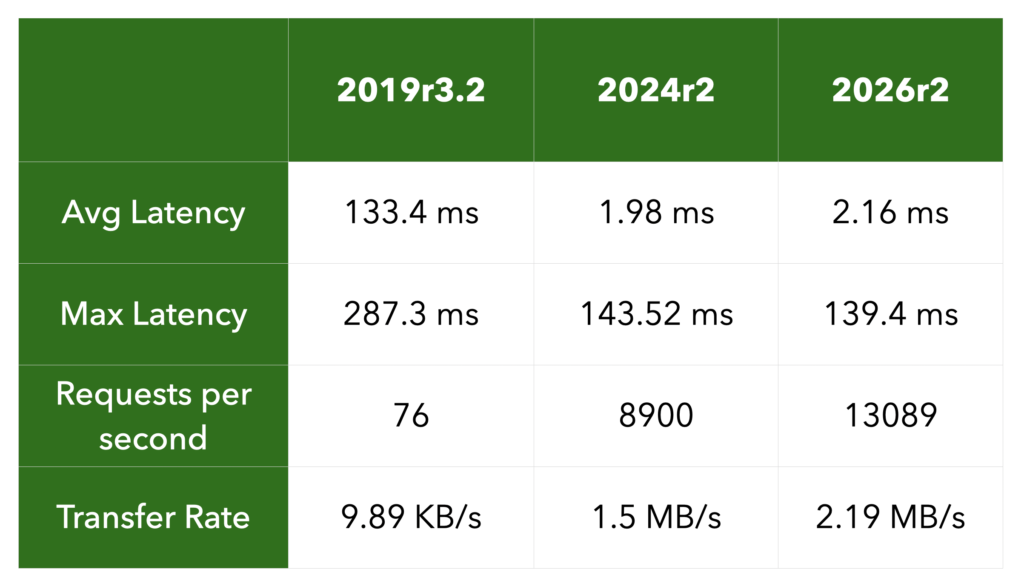
That said, even with a 50% increase in this benchmark, most developers won’t notice a big difference. When the application has to deal with frequent database queries, for example, shaving a few milliseconds off request handling is a drop in the bucket. But where it does matter, it matters a lot. If your application is a plain REST API serving data for a mobile app with thousands of concurrent users, or when it is deployed to a constrained environment like a Raspberry Pi, this kind of improvement can make a real difference.
SEO Improvements Done Right
In 2026r1 we introduced the ability to call WebPage.Show from within the HandleURL event, which opened the door for serving pages to search engine crawlers. It worked, but it came with a significant cost: even for users who were not using this feature at all, benchmark numbers dropped from 7-8k requests per second down to 1-2k. That was not acceptable (pushing us to review the overall web framework performance on this release), and it also introduced edge cases for codebases that expected HandleURL to run without any session context active, because creating a session context on top of an existing one is not allowed.
In 2026r2, this is fixed properly. The performance penalty is gone for everyone. If you want to use WebPage.Show from HandleURL for SEO purposes, you now opt in explicitly by creating a WebSessionContext instance yourself, passing the requestparameter, before calling Show. It is a small step, but it makes the intent clear and keeps things safe for everyone else.
WebSessionContext has a new Constructor, accepting a request As WebRequest parameter.
We are not stopping here. SEO is important, and we are already working on a proper URL router to make these workflows easier and more capable. Stay tuned!
DatabaseConnection Gets a PerSession Mode
If you use a Database Connection in your web project, you are probably familiar with how they work: you add one to your project in the Navigator, give it a name, say MyDatabaseConnection, and then you reference it by that name anywhere in your code to run queries.
By default, that connection behaves like a singleton. Every session in your web app shares the same MyDatabaseConnectioninstance. For most read-only usage that is fine, but the moment you start using transactions, you can run into trouble. One session’s transaction can interfere with another’s, or worse, data from one session can leak into another’s results.
The new PerSession property in 2026r2 solves this at design time. When you enable it in the Inspector, MyDatabaseConnectionstops being a shared instance. Instead, each session gets its own connection, created lazily the first time that session needs it, and automatically destroyed when the session ends. Your code does not change, you still write MyDatabaseConnection.SelectSQL(...) as you always have, but now you can be confident each session is operating in complete isolation.
WebGraphics Gets DrawPath and FillPath
WebGraphics now supports DrawPath and FillPath, bringing it in line with what Desktop and Mobile targets have had for a while. If you have been writing custom drawing code for other targets using Graphics.DrawPath or Graphics.FillPath, that code can now be reused in your web projects without modification.
This is exactly the kind of cross-target parity that makes Xojo powerful. Check the WebGraphics documentation for the full details on how paths work.
WebImageViewer: Goodbye, Flicker
A small but welcome fix. When updating the Picture property on a WebImageViewer, previous versions would show a brief but noticeable blink, the image would disappear for a few milliseconds before the new one appeared. In 2026r2, the new image is shown directly. No blink, no flicker. It just works.
Wrapping Up
As usual, 2026r2 also includes a solid round of bug fixes across the web framework. Check the full release notes for the complete list. This is a release that delivers on multiple fronts: raw performance, correctness, cross-target parity, and laying better groundwork for SEO. The thread handling changes alone make this a compelling update for anyone running Xojo web apps under load. And with a proper URL router on the horizon, the SEO story is only going to get better.
Happy coding!
Ricardo has always been curious about how things work. Growing up surrounded by computers he became interested in web technologies in the dial-up connections era. Xojo has been his secret weapon and language of preference since 2018. When he’s not online, chances are he will be scuba diving … or crocheting amigurumis. Find Ricardo on Twitter @piradoiv.