

Spotlight On posts focus on Xojo community members. We’ll use this space to tell the stories of people using Xojo, share amazing Xojo-made apps and spread awareness of community resources. If you have an app, a project or a person you want to see featured in Spotlight On, tell us about it!
You may have seen this thread in the Forums, This is the farthest I’ve pushed canvases, showcasing Xojo user Christian Wheel’s use of the Canvas control from a custom animated GIF renderer built entirely in Xojo code, to slick audio production tools for radio and podcasting. Many people reached out and wanted to know more about this project and what else Christian has been doing with Xojo. As it turns out, he’s been doing quite a lot! In this post Christian talks about vibe coding, laser cutters and why Xojo’s “idea-to-executable” speed made it the perfect tool for getting things done, at Apple and beyond.
Mac, Windows or Linux?
Windows & MacOS, I use both daily. I generally prefer Windows desktops and Mac laptops, even though I do have a Mac Studio and a Windows laptop too. I literally have dozens of computers, haha.
What do you wish more people would ask you about when it comes to your work? Is there an aspect of your work that people often overlook but you wish they were more curious about?
Honestly, nobody really asks me about my work! Most people know me from my work as a radio host and DJ, so that’s where the majority of my interactions occur with other people. My software development endeavors have always been my “side-gig” even though I’ve had some successes in that area too. Just the fact that I get to talk about computers with anybody is a breath of fresh air for me.

What software or skill is on your “Learn Next” list and why?
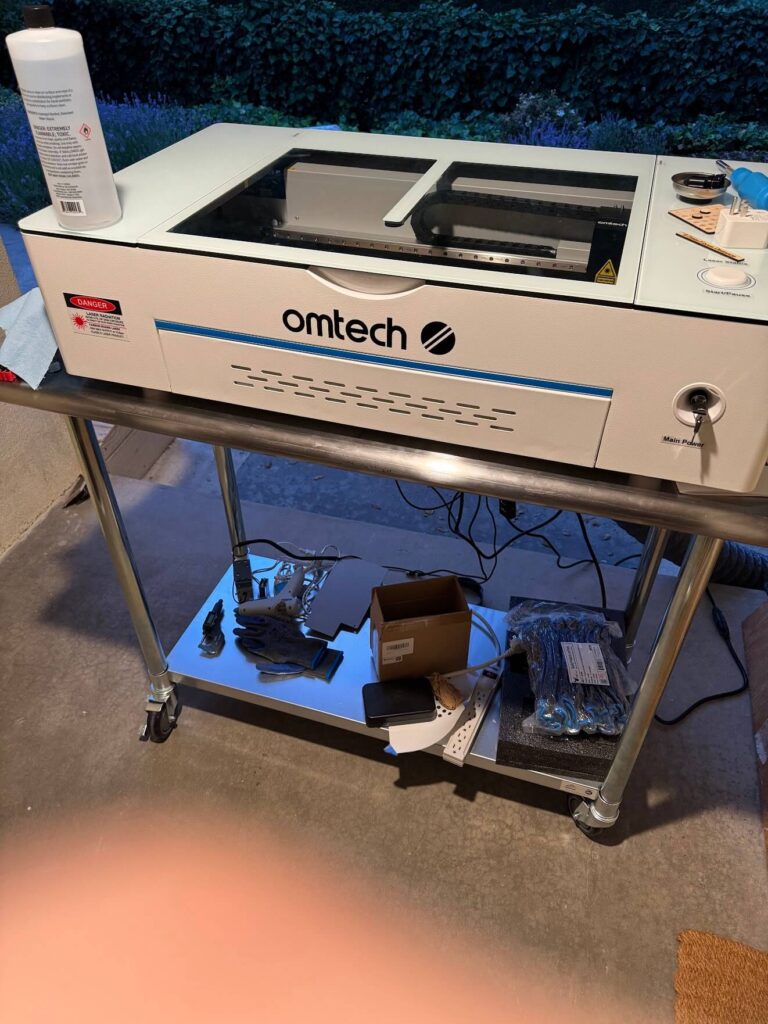
Last year I picked up a laser cutter and 3D printer and haven’t yet been able to explore them as much as I would like to. I’ve done some 3D modeling for use in animations and visuals, but that’s very, very different from modeling tangible objects, where there needs to be a lot more consideration for engineering principles involved. I also feel like it’s cliche in 2026 to add “AI” to a list of things to learn, but it’s genuinely true. I’ve been running some local models and while I’ve dabbled a bit, I’d like to dive more into training my own models, LoRAs, etc.
Between those maker tools and my UV Printer, I want to lean more into making aesthetic mods for PC hardware and getting more into exotic and custom PC builds.
Even though I’ve been a “content creator” on the radio for decades (including a “call for help” radio show about tech, software and hardware), I plan on going all-in on YouTube in the tech space shortly, covering everything from PC part reviews, unboxings, benchmarks, build guides, troubleshooting, homelab projects, creator gear, software tools, Apple, and extreme-themed PC builds. I’ve made significant investments in building studio spaces and an 8K cinema-grade production pipeline, so I’m taking this seriously!
What is something that has surprised you about coding in the last 5 years?
I definitely did not have the rise of Vibe Coding on my Bingo card. There are so many interesting aspects to it. At the end of the day, getting more people interested in software development is a great thing for the industry. There are lots of people in our field who enjoy gatekeeping it, and I understand that the industry was already fiercely competitive before the flood gates opened to everyone. But this is the new reality and everyone has to adapt. But on the the other hand, for people without a strong background in development, experience with security and proper testing, you end up with a lot of buggy, potentially dangerous applications created by those without the experience to put in the final 10% of every project (which, as we know, is what takes 90% of the time). This is all evolving so fast and there’s no doubt in my mind that we’re going to see some very high-profile embarrassments and systemic software failures caused by vibe coding. And in a way, we have to, that’s the only way things will improve.
Xojo isn’t the only tool in your kit. What is another piece of software more people should know about?
There are so many great third-party tools in the Xojo ecosystem. While I love learning new things, sometimes you just need to get something done and it’s faster to buy something rather than build it yourself. Shout outs, in no particular order, to Christian Schmitz/MBS, Anthony Cyphers/GraffitiSuite, Tim Parnell/Lifeboat+TPLM, Jim McKay/PiDog, Björn Eiriksson/Einhugur, Marc Zeedar/xDev, and so many more that really boost the Xojo experience. For testing, Parallels on Mac, and VMware Workstation on Windows, are invaluable to me. The ability to take and revert to snapshots in seconds is like magic. You also can never underestimate a good text or hex editor. For text on macOS I use BBEdit and on Windows Notepad3. UltraEdit is fantastic for hex on both.
How/When did you find Xojo? What did you first build with Xojo?
I discovered REALbasic in the early 2000’s when Microsoft made the decision to go all-in on VB.Net and away from VB6/COM. While it shared a lot of the same keywords and syntax, VB.Net is a fundamentally different language. So I figured if I had to learn a new-but-similar language anyway, I might as well learn something cross-platform. For much of the decade I was a DIY Windows snob though, and refused to spend on Apple hardware, which kept me using OS X on Virtual Machines and such. Once the iPhone became popular I finally gave in and bought an iPhone to complement my Android, and a MacBook Pro to complement my gaming laptop. Most of the things I built with Xojo were just internal tools, things that improved my own workflow in radio and DJing. Many of my tools proved useful to coworkers, and with the increase in Apple’s hardware market share, Xojo was instrumental in allowing me to create distributables for everyone.
What do you build with Xojo now?
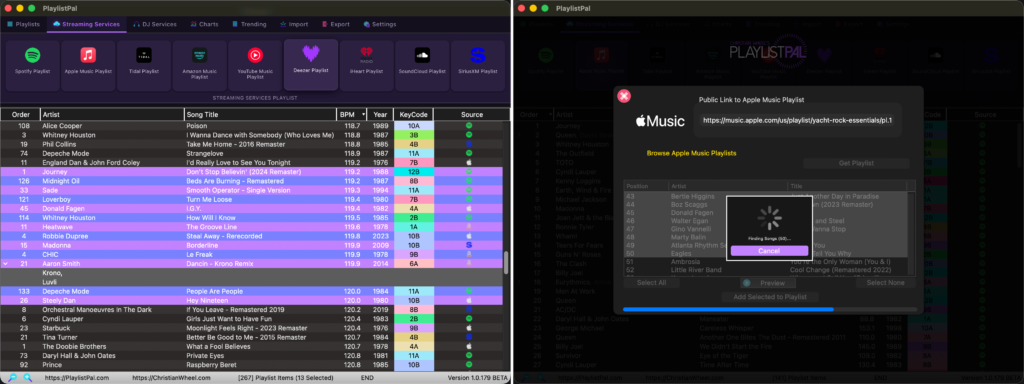
Most of the things I’m building at the moment are audio related. I have a ton of legacy VB code that deals with audio on Windows, and I’m slowly Xojo-ing it to be cross-platform. One of my main apps I’ve been developing for 4 years now, is called PlaylistPal. It’s a playlisting app for DJ’s that basically lets them import playlists from any source, streaming service, or even a text request list, and load it into their DJ software. There’s a lot of work done under-the-hood to resolve songs into universal ID’s and let DJs match those playlist entries with music they already own.
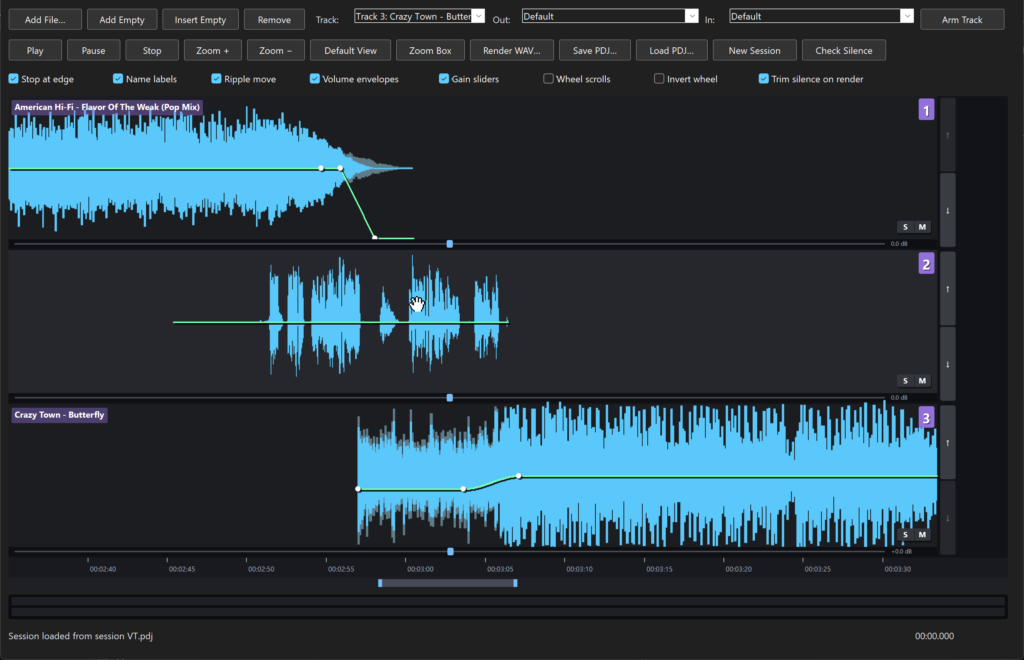
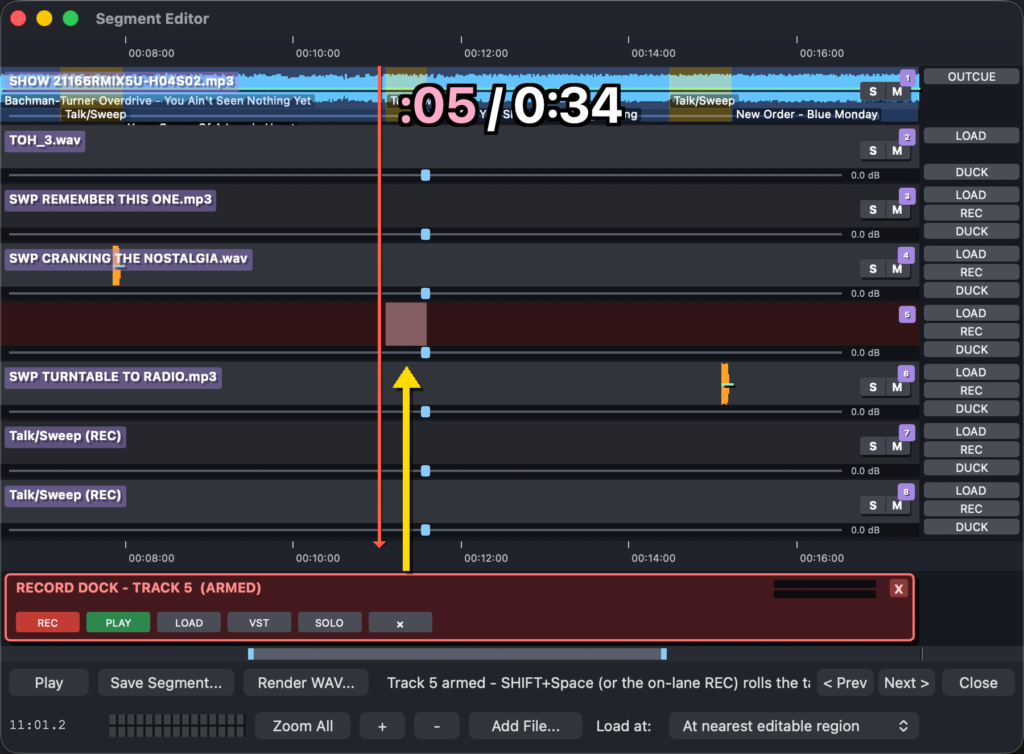
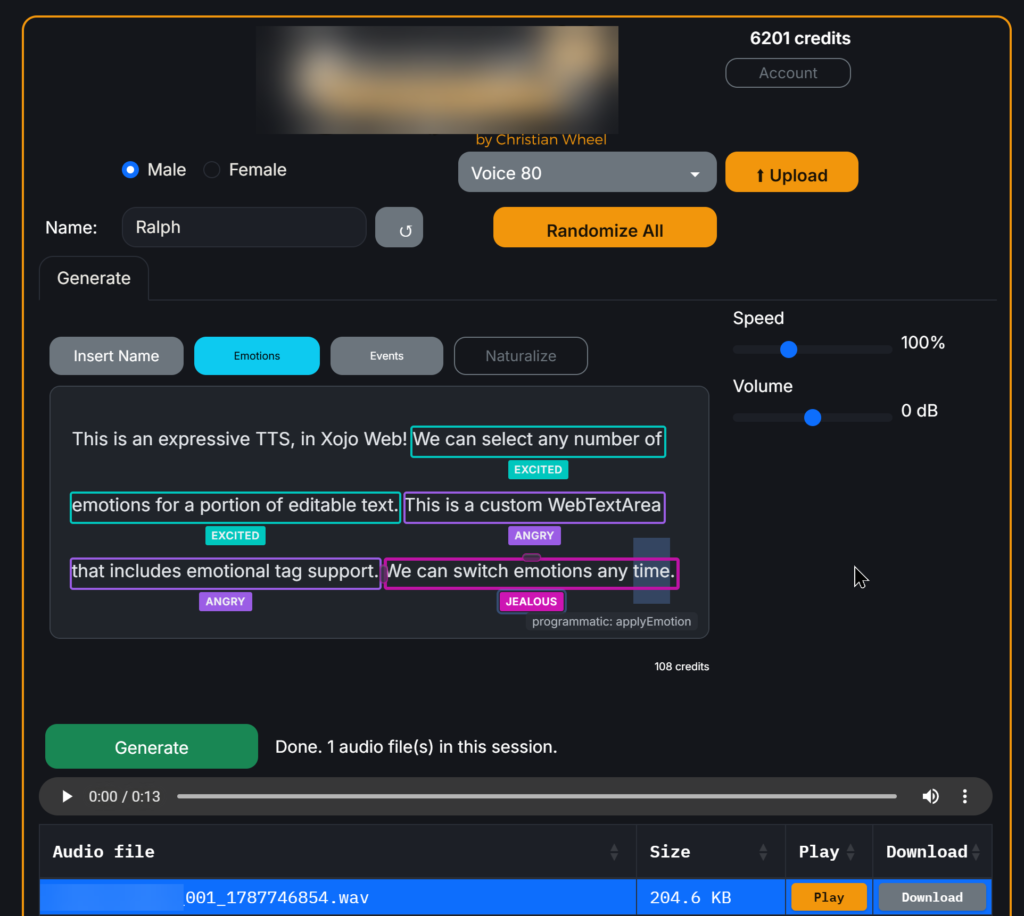
I’ve also been building audio production software for radio shows and podcasts. As shown in the forum post, the Xojo canvas is a powerful tool. It actually reminds me of the old days of DOS programming when you had to draw everything yourself, handle mouse and keyboard input at a very low-level, and actually optimize your code to run fast.
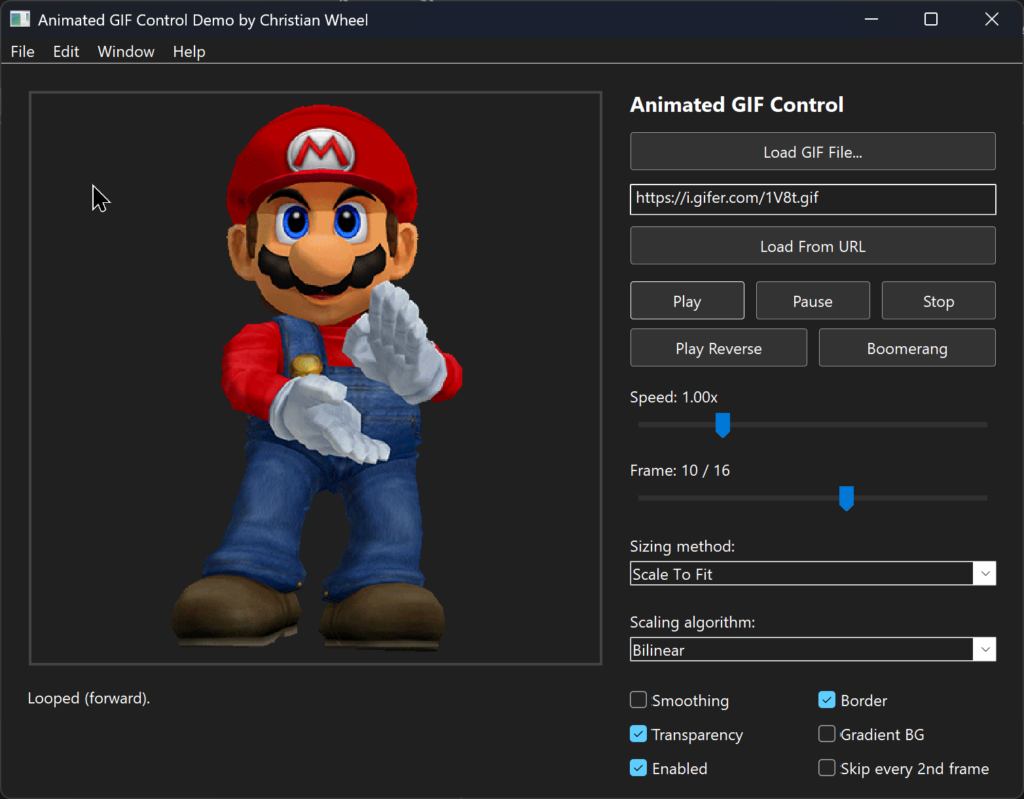
It has been fun to create new UI elements in the canvas. Another Canvas-related project I’ve been working on is an animated GIF control, completely in Xojo code. It parses the binary image data of an animated GIF file and uses a timer for each frame’s duration. It can be a bit slow to load all the frames to memory, but it does so in a thread so as to not slow your app down. It supports transparency via alpha channel or color replacement. It’s containerized so you just drop it into a Window, set some properties, call some methods, and receive events. I still have some bugs to work out but it’s been a lot of fun to develop.
I also just recently fell into a project creating digital signage software, for billboards, restaurant menu boards, trade show screens and such. I needed software to control my own LCD panels and found the existing options lacking or overly complicated, so I decided to create my own in Xojo. The wonderful thing that Xojo brings to a project like this is I can compile for everything! The user can create their slideshow on Windows or Mac and run the project connected to their screens on anything from a Raspberry Pi to a Mac Mini.
Do you earn a living with Xojo?
At the moment, no. I don’t have anything for sale. But eventually, once my software is at a point where I feel it’s marketable I’ll flip that switch. Until then, it’s test, test, test!
Do you use Xojo for any hobbies?
I find that Xojo, both Desktop and Web, makes GREAT frontends for AI applications. I have a great little AI stack for audio that I’ve developed on Windows. On Desktop I can build a UI to run the python scripts directly and capture their output, or I can build it into a Web App and create an API that I call from a macOS or Web app. The same python scripts can be Dockerized for Linux deployment when I want to put them on the internet and build a real web app to control them. I recently started playing with RunPod, which lets me load my Docker apps in their cloud and spins up instances on demand, so they can use cloud GPUs that aren’t practical to host locally.
What’s your biggest Xojo success?

Probably using it at Apple. I worked for Apple for a few years and quickly identified the need for a few internal tools to make things simpler for our department. I used Xojo to create them and it was fast and easy to work with, simple to make updates, and it was just accepted. Nobody questioned what language I was using, they just cared about functionality. But Xojo’s rapid idea-to-executable workflow really worked in my favor at Apple.
Looking back, how long did it take for your app vision to evolve from a blank project into a working solution?
What I like about Xojo is that you can go from nothing to something SO quickly. It’s adding all the niceties that can take a long time. Little touches and details can all be accomplished if you’re willing to put in the work. Of course, not every project requires you to put in the work. You don’t need smooth animations and lots of options for everything you build. I think for most of us, we have an idea, spend some time in the code editor building out our algorithm, and then haphazardly toss a few buttons and textfields onto a Window to test things out. Only once we’ve got something somewhat-working do we refine the user experience and engage with the artistic side of the app. That means for personal tools, you can go from zero to finished in a few minutes or hours. But for a major project… I mean gosh, I’ve been building PlaylistPal for FOUR YEARS and still make updates constantly, but I had friends testing it by the end of the first week. Your app is really as good as the time you put into it, but the benefit of Xojo is that you’re generally free to pause and release at any point along the way.
How do you decide when to use Xojo versus another tool or language?
I think personally, these days I default to Xojo unless the project has a need that Xojo can’t address. For example, I recently had a Windows project that required a single portable executable with no accompanying libraries. I could, of course, use Xojo and wrap up the project in something like BoxedApp, but that can end up being problematic in other ways. So I ended up using .Net for that one. But other than exceptions like that, Xojo is my go-to these days. I have decades of classes and modules that already have a bunch of code that I’m used to including in every project, so I try to stick to it as much as possible unless there’s a reason to use something else.
What does Xojo do particularly well compared to other tools?
The basics between platforms is largely the same and the differences are insulated from you, for the most part. Obviously the more things you want to do that deviate from standard behaviors, the more work you’ll need to put in, but once you wrap your head around the way Xojo does things, there’s only a little bit you need to learn about other platforms in order to implement your vision.
Which three Xojo language features or framework capabilities do you find yourself relying/using on the most?
- Ease of cross-platform. Most things just work seamlessly across platforms and I don’t have to worry about it. Really intricate algorithms that I wrote for desktop can be literally copied and pasted into a web app. That’s just so… chef’s kiss.
- Canvases. They’re a blank slate that lets you create whatever you can imagine. If you want a button with a dragon on it that breathes fire when you click it, as long as you’ve got the time and the talent, you can create it.
- I’ve been diving deep into Xojo Web lately. I love that you can do anything from build a full web app with pages and controls or go really low-level to respond to individual HTTP requests. It’s really great.
How important has the Xojo community been in your development journey?
Absolutely vital. The community is a lifeline, everyone there truly wants to be helpful to others. You also never know when someone on the Xojo dev team may drop in to offer some advice too. I know this for sure, I would have never been able to create the things I have without the community.
Where do you typically go when you get stuck?
Depends on what I get stuck on! If it’s a language or framework question, it’s either the Xojo Documentation site, or Google to end up on a Xojo forum post. If it’s an approach or algorithm question, StackOverflow has a lot of answers. Chatbots are also getting quite adept at answering some of these question as well.
If you were introducing Xojo to a friend, which three words would you use to describe it?
I really only need one word: Versatile. I really believe that versatility is Xojo’s greatest strength.
What features or improvements would you most like to see in future Xojo releases?
Something I think Xojo could do better is to build in a lot of the controls or behaviors that we end up creating ourselves. Some control examples from .Net that ship with the framework include CheckedListBox, FileSystemWatcher, ListView, LinkLabel, PropertyGrid, SplitContainer, StatusStrip, TreeView, etc. These are all things that we could (and many of us have) build ourselves but it would be nice to have a larger collection of controls built in.
What advice would you give to someone just getting started with Xojo?
- Make sure you’ve got an open mind! The “Xojo way” of doing things is not always the same as the way you may be used to.
- Don’t use DoEvents! The temptation is huge, and I know it worked in VB, but there’s a good reason why everyone advises against it. There are a select few times when it’s appropriate and when you encounter one you will likely have enough experience with the language by then to know it’s okay. Until then, just say no!
- Have patience with folks in the forums. Everyone really does want to help, even when things get heated. There’s a wide mix of people with varying experience levels, spoken languages, neurotypical/neurodivergent, and varying stress levels, so keep in mind that everyone generally means well even if they may have a hard time expressing it at times.
Thank you to Christian Wheel for answering questions and sharing his Xojo experience with the community. If you have an app, a project or a person you want to see featured in Spotlight On, tell us about it!