
In the new DrawControlInLayoutEditor event of Xojo, which is available for MobileCanvas, AndroidMobileUserControl, and iOSMobileUserControl, there are properties available that otherwise do not exist in the Graphics class for mobile projects.
Specifically, the following properties can be used there:
- Graphics.FontName
- Graphics.FontSize
- Graphics.FontAscent
These properties are known from other Xojo targets (e.g. Desktop), but are not part of the official mobile API and are not shown in Autocomplete. They cannot be used outside of this event.
In contrast, the mobile API property Graphics.Font cannot be used within the DrawControlInLayoutEditor event. The usage is strictly limited to the DrawControlInLayoutEditor event. Using these properties in runtime code will result in errors.
These properties allow for more accurate text rendering in the layout editor, for example in custom controls where font metrics need to be considered.
Although these properties are not part of the mobile API, they can be used selectively within the layout editor context.
This code will work fine in your mobile control’s DrawControlInLayoutEditor event:
Var s As String = "Happy coding!"
Var x As Double = g.Width / 2 - g.TextWidth(s) / 2
Var y As Double = g.Height / 2 - g.TextHeight / 2 + g.FontAscent

g.DrawingColor = Color.Red
g.DrawOval(0, 0, g.Width, g.Height)

g.DrawingColor = TextColor
g.Bold = True
g.FontName = "Times New Roman"
g.FontSize = 16
g.DrawText(s, x, y)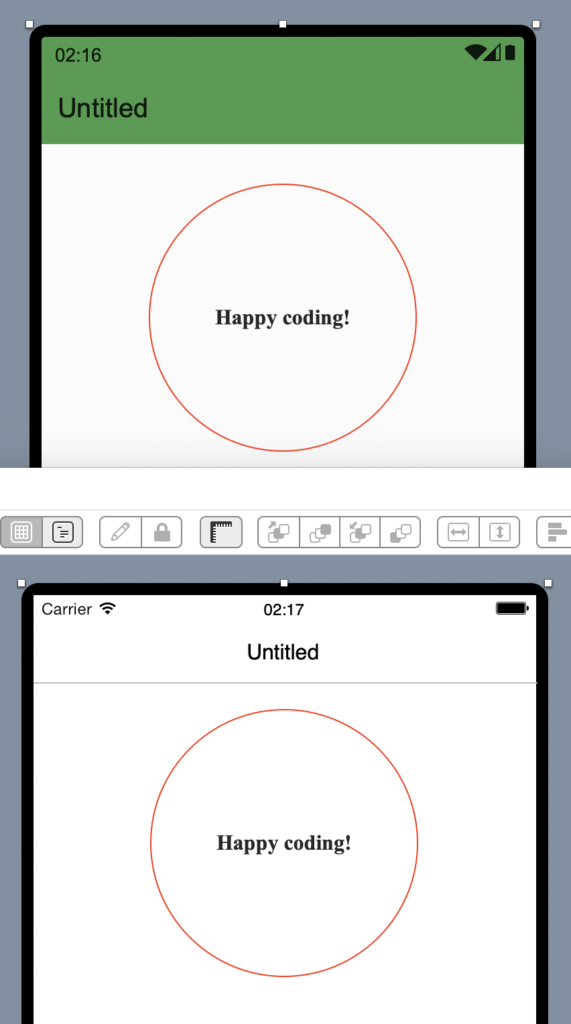
Happy coding!
Martin T. is a Xojo MVP and has been very involved in testing Android support.