
Jade, the Xojo AI assistant, has several significant improvements in 2026r2 that make it even more useful.
Settings
Let’s start with the Settings window, which now has its own AI panel for adjusting how Jade works.
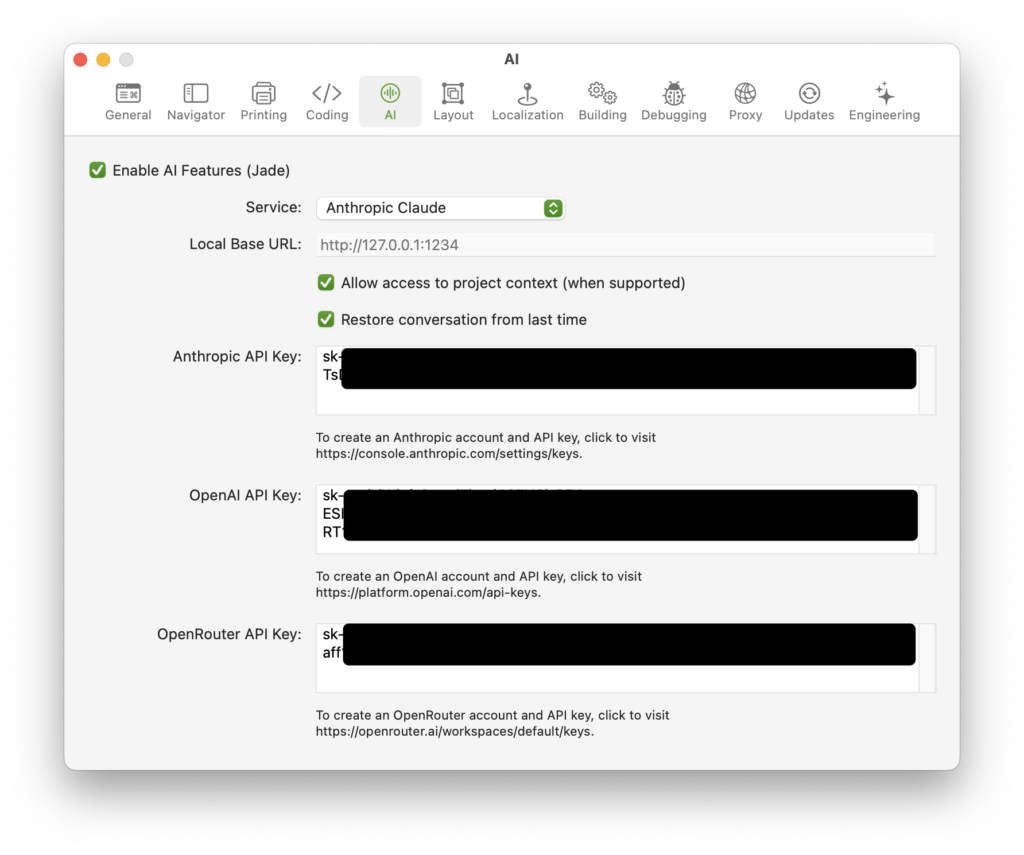
By default, “Enable AI Features” is checked. However, if you are not onboard the AI train, then you can uncheck that setting to turn off Xojo AI integration. This removes the Jade button from the toolbar and also disables the Help menu option.
With AI Features enabled, you can choose the Service to use. By default, “Anthropic Claude” is selected so that your previous Jade configuration works the same as before, but you now also have all these services to choose from:
- Anthropic Claude
- OpenAI GPT
- OpenRouter (Anthropic)
- OpenRouter (OpenAI)
- Local
More information about each of these is in the next section.
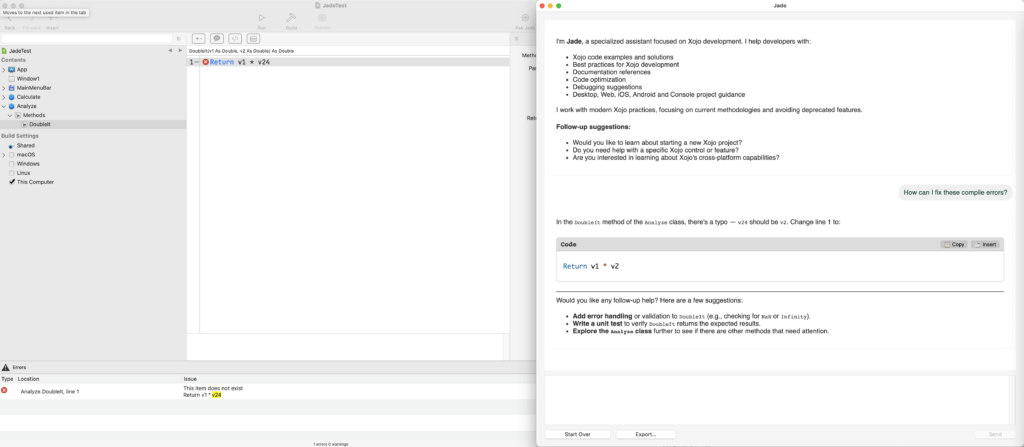
The “Allow access to project context” option lets Jade ask for information about your project, such as the names of project items, their source code and any compile errors.
The “Restore conversation from last time” option indicates if your last Jade conversation will be restored to the chat window when the IDE restarts.
Below this are the text areas where you can enter API keys for the services you are using.
Services
Anthropic Claude
When Anthropic Claud is selected, Xojo uses the most recent version of the Claude Sonnet model, which is currently 4.6. To use this service, you will need to create an Anthropic account, generate an API key and add some credits.
Access to project context is supported with Anthropic Claude.
OpenAI GPT
When choose OpenAI, Xojo uses a recent version of the gpt-mini model, currently gpt-5.4-mini. This particular model is fast, relatively inexpensive and well suited for coding purposes. To use OpenAI, you will need to create an OpenAI account , generate an API key and add some credits. There is also an option to earn some free credits that you can optionally turn on.
Access to project context is supported with OpenAI.
OpenRouter
OpenRouter is a unified API service that gives access to hundreds of LLMs from different providers (OpenAI, Anthropic, Google, Meta, etc.) through a single endpoint and key.” Like the others you will first need to create an account, generate an API key and purchase credits. OpenRouter applies these credits as appropriate when using the models you have configured.
There are two options for OpenRouter, so that you can tell it whether to use the Anthropic or OpenAI API. When you choose Anthropic, OpenRouter will automatically route you to Claude models. When you choose OpenAI, OpenRouter will direct you to the default model specified in your OpenRouter account settings.
Not all models will work with Jade and some models have limitations. Currently, only OpenRouter with OpenAI and an OpenAI GPT model supports project context. If you want to try other models, you will likely need to disable the “Allow access to project context” setting in Xojo.
Local LLM
A local LLM is a model that you are running locally on your computer or server you control. To run a local LLM, we recommend using LM Studio which makes it easy to download and run models on a local server.
When this is selected, you also need to provide the base URL for your server. With LM Studio, it is typically:
http://127.0.0.1:1234In our testing with Xojo we’ve found that a Qwen model, such as qwen3-coder-30b works OK. Other models may not provide useful responses or even work at all. Even though this model works, it is far less capable than Anthropic Claude or OpenAI GPT.
If you want to use Ollama, you’ll have to specify the model name as part of the base URL like this:
http://127.0.0.1:11434#qwen2.5-coder:14bA local LLM does not have access to project context and choosing this service option currently ignores that setting.
Which Should You Use?
Based on our internal testing, Anthropic Claude has the most accurate responses. It is also the slowest and most expensive.
OpenAI with GPT is the fastest and is relatively inexpensive for what you get.
OpenRouter is really only recommended for advanced users, but it does provide an easy way to switch to specific models.
A local LLM is free to use and completely private, but it is also much slower and far less accurate. Depending on the model you choose, a local LLM also requires significant computing resources (RAM and GPU).
I hope you find these Jade improvements useful to you!
Paul learned to program in BASIC at age 13 and has programmed in more languages than he remembers, with Xojo being an obvious favorite. When not working on Xojo, you can find him talking about retrocomputing at Goto 10 and on Mastodon @lefebvre@hachyderm.io.